
Introduction
IBM Sterling Intelligent Promising empowers retailers to streamline inventory operations and deliver accurate fulfillment commitments, driving higher sales performance and customer satisfaction. One of its key capabilities is the ability to intelligently create sourcing rules based on specific business conditions. These rules automatically determine the optimal fulfillment ship node, ensuring that orders are sourced efficiently and in alignment with operational priorities.
Key functionalities
- Inventory visibility: It enables real-time inventory visibility across all locations, preventing over-promising and stock outs.
- Accurate order promising: Through efficient inventory management, it ensures accurate delivery date commitments during order placement customer.
- Optimized fulfillment: Configure rules in intelligent promising according to business requirements to ensure orders are fulfilled efficiently and cost-effectively.
- Customer experience & satisfaction: Accurate delivery date promises, effective inventory management and prevention of stock out issues ensure customer satisfaction and a smooth experience.
- Explainer: For every fulfillment decision, IBM Sterling Intelligent Promising provides clear visibility into the reasoning behind it — empowering retailers with actionable insights into what was chosen, why it was chosen, and how it aligns with business goals.
IBM Intelligent Promising window
On the Intelligent promising home screen, user can access key services that support sourcing and scheduling configuration to fulfill the orders intelligently based on business requirement. These services include:
- Inventory – Manage and monitor stock levels.
- Promise and Fulfill – Define sourcing and scheduling rules, and optimize sourcing strategies.
- City Cool – To create an order.
- Configuration – Configure Nodes, distribution groups (DG), Fulfillment options.

Promise and Fulfill
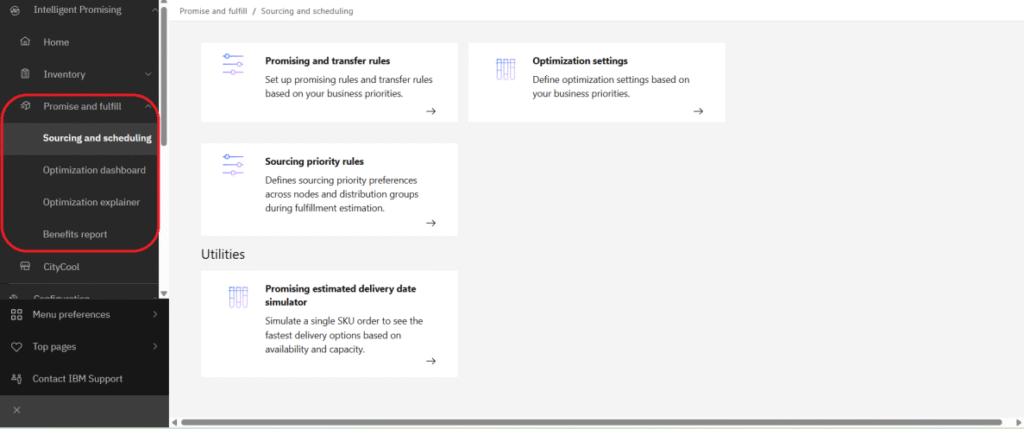
Accurate delivery date commitments are achieved by using real-time data from inventory, sourcing, and logistics systems ensuring that orders are fulfilled on time and aligned with customer expectations. To support this, Intelligent Promising provides four key features that help determine the optimized ship node:
- Sourcing and Scheduling
- Optimization dashboard
- Optimization explainer
- Benefits report
To define sourcing and scheduling rules and optimize sourcing strategies, navigate to the Promise and Fulfill menu.
- Sourcing and Scheduling
This feature enables the definition of sourcing and scheduling rules that determine the most optimized ship node to fulfill the Order.
- Promising and transfer rules
To create a promise and transfer rule, navigate to Sourcing and scheduling then select promising and transfer rules, then following screen will open.
This page contains a list of already created promising rules.
- Promising rules
This rule is applied to determine the appropriate sourcing location, based on defined conditions and configured restrictions, in order to fulfill the requirement.
Requirement: If the Customer type is GOLD, the Seller Organization is 3rdParty, and the Delivery method is Shipping, then the fulfillment location must be a DC (Distribution Center).
Created a rule in a name of 3rdParty Seller
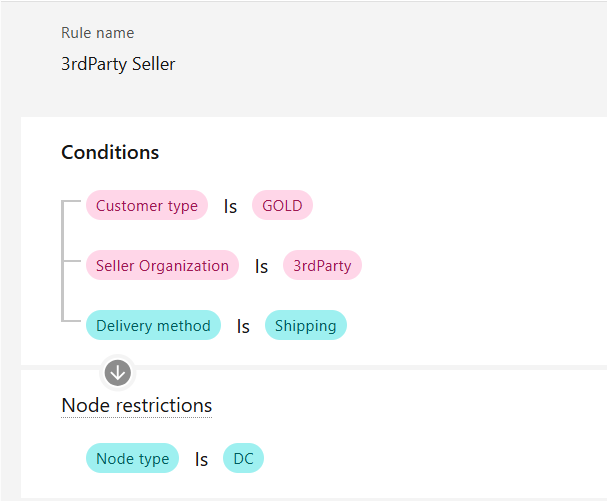
OMS will attempt to source inventory from a node whose type is configured as DC (Distribution Center).
- Transfer rules
This rule defines the process for determining the Ship Node from which Ship Node (within the organization) the inventory should be procure when the item is unavailable or low stock at the Ship Node.
Requirement: If the Destination is Auro_flagship_2 or Auro_flagship_1, the system must procure inventory from a ship node configured with the DC (Distribution Center) node type.
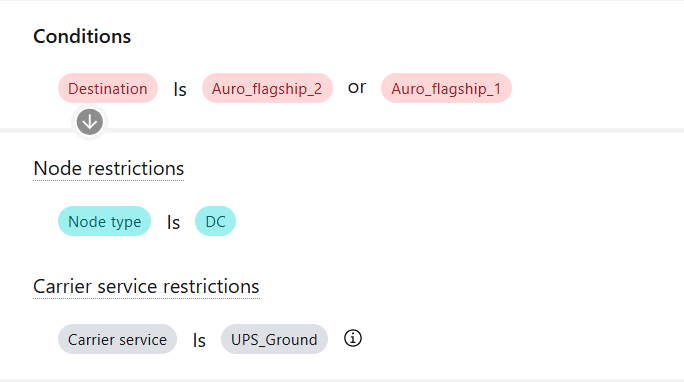
OMS will attempt to procure the inventory from DC if the Destination is Auro_flagship_2 or Auro_flagship_1.
- Sourcing Priority Rules
Among the multiple Ship Nodes, a priority can be assigned to each node. Based on this priority, OMS will attempt to source inventory from the appropriate Ship Node to fulfill the Order.

The following are sample sourcing rules: (1) if the hazmatClass is Class2, then first priority is Aurora_WH2. (2) If the order value is greater than 199, the first priority is Auro_Sore_961 and the second priority is Auro_Store_165.
- Optimization settings
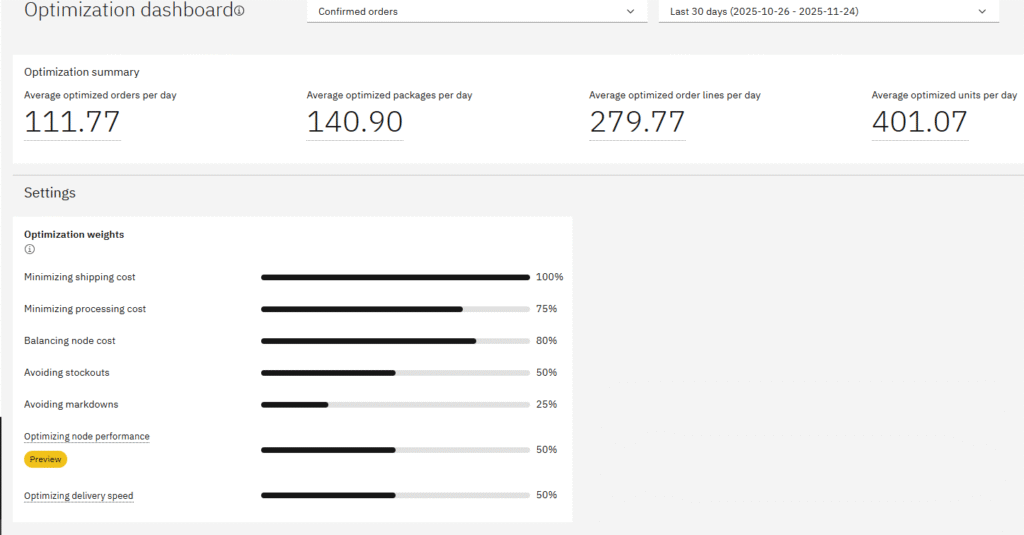
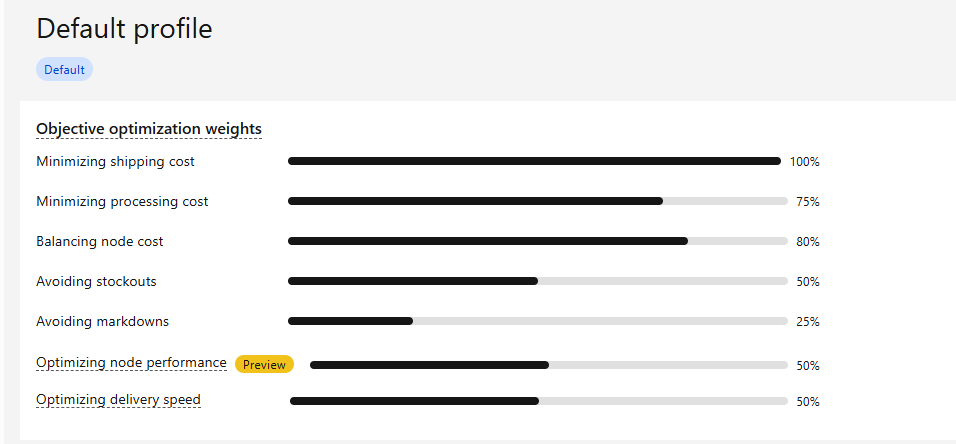
Here, the available options can be optimized based on business requirements to choose most suitable Ship Node for fulfilling the order.
Below are the options,
- Minimizing shipping cost – Fulfill the order in a most cost effective way also meet customer expectations. The following variables will be considered to minimize shipping cost:
- Delivery date
- Node carrier applicability
- Carrier schedule
- Ship date
- Dimensional weight
- Carrier rates and zones
- Node calendar
- Balancing node capacity – This is to choose the Ship Node based on the Node capacity.
- Minimize processing cost – Fulfillment will be processed based on the most cost-effective way to process the shipment. (Hourly rate * Hours to process a unit * Qty in process).
- Avoiding stockouts – The focus will be on preventing stockouts at the Node
- Avoiding markdowns – It will attempt to source inventory from nodes with excess or slow-moving stock in order to avoid the markdowns.
- Optimizing node performance (Preview only) – It will source the inventory from ship node where the cancellation and re-schedule is low.
- Optimizing delivery speed – Here, the priority is to deliver the order as earliest to customer with the slight increase in carrier cost.
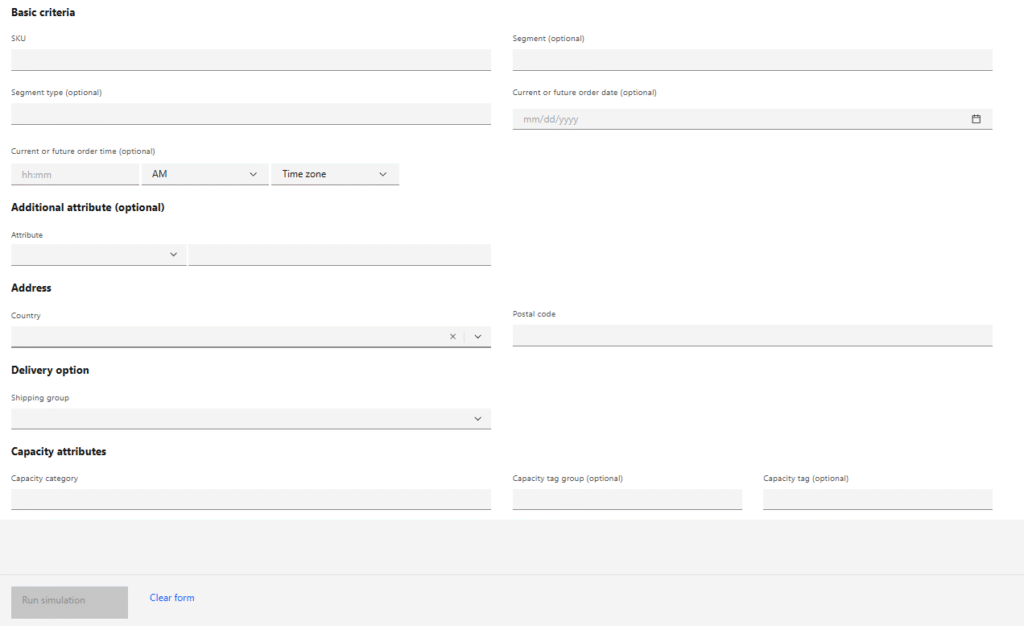
- Estimated Delivery Date Simulator
The Estimated Delivery Date Simulator allows users to test and validate delivery dates based on the provided information, ensuring accurate promise calculations and improved customer experience.
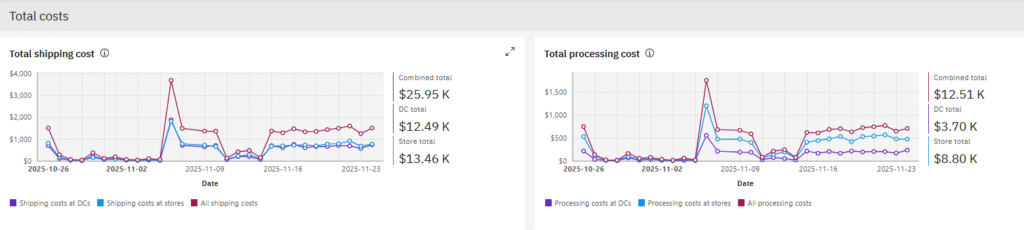
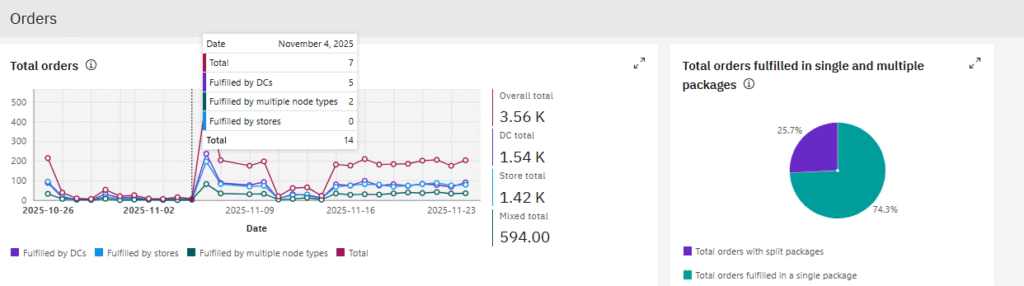
- Optimization Dashboard
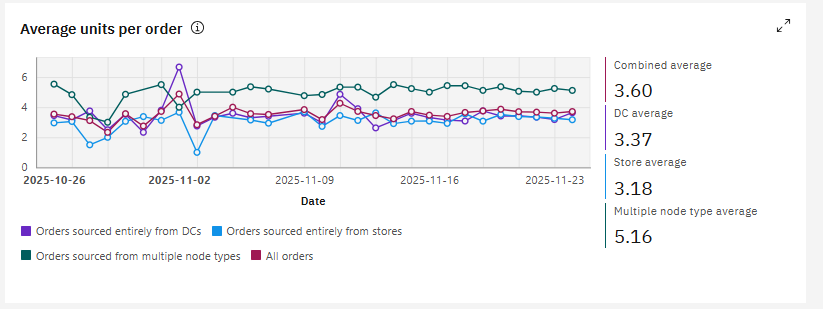
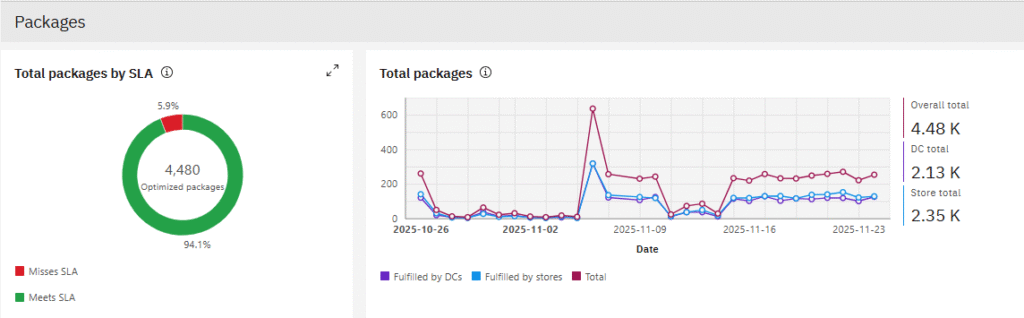
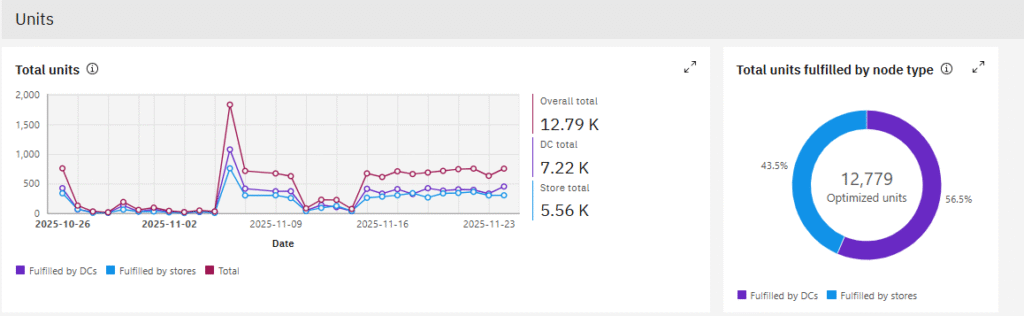
The Optimization Dashboard page provides key metrics, including average optimized orders, packages, order lines, and units processed per day.




- Optimization Explainer
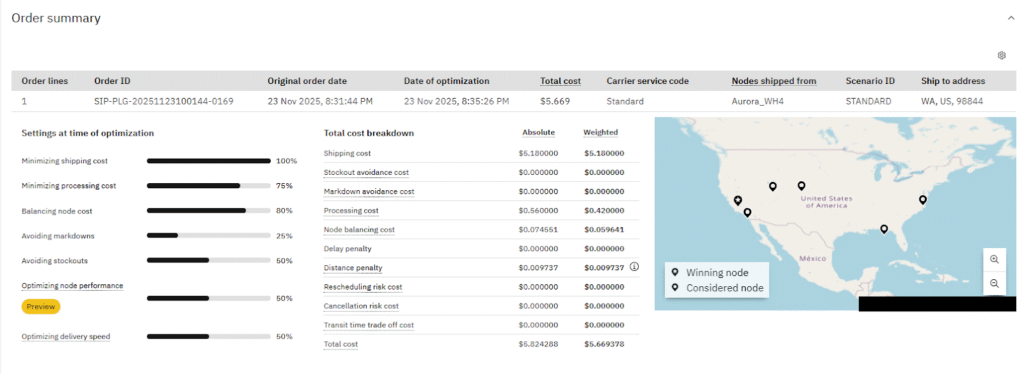
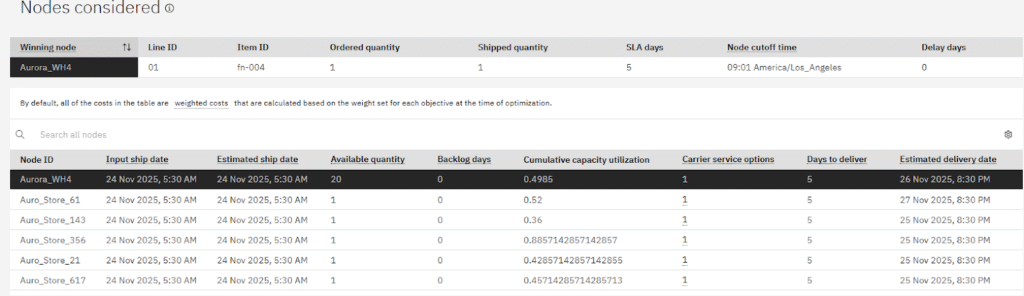
For each order, the Optimization Explainer demonstrates how the system applies optimization logic to fulfill by meeting the customer expectation.
Shipment Info

Order Line Info

The Optimization Explainer display all nodes considered for a line with the winning node, and presents the of the optimization settings variables applied across all considered nodes.
- Benefits report
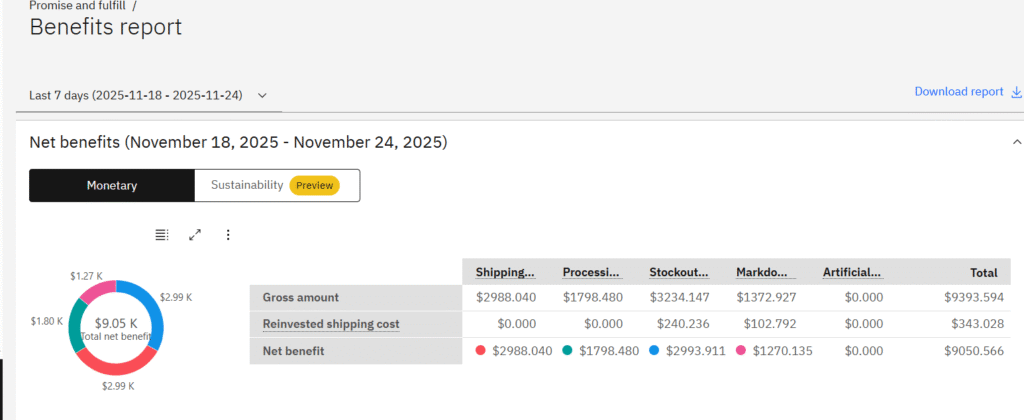
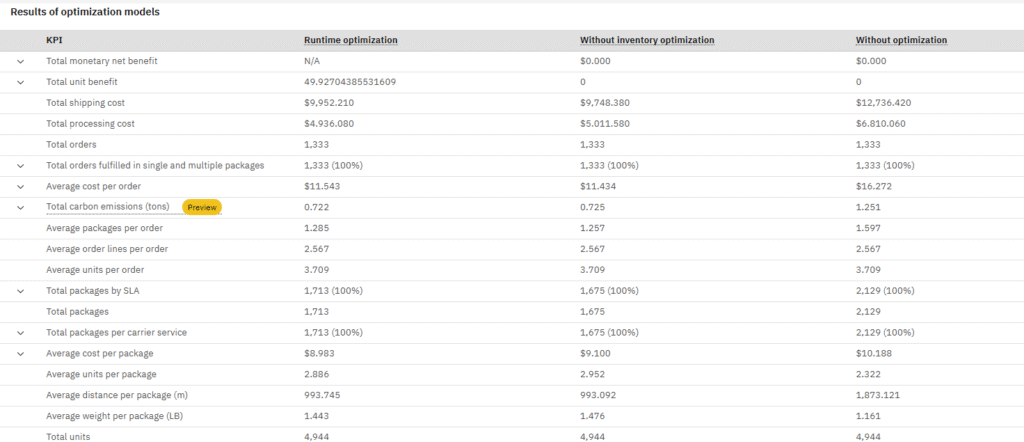
This report highlights how the Optimization settings deliver measurable benefits across each available option, demonstrating the intelligence and promise of IBM Sterling in driving operational efficiency.
Here, the business can view the benefits gained (in dollars) from using the IBM Sterling Intelligent Promising optimization settings for the specified custom date range.
Conclusion
IBM Sterling Intelligent Promising transforms supply chain and order management by uniting real-time inventory visibility, and customer-centric delivery options with advanced sourcing strategies that precisely determine the optimal ship node. In doing so, it empowers enterprises to consistently honor customer commitments with efficiency, reliability, and transparency—delivering on the true promise of intelligent commerce.