
Introduction
Smart Sourcing in IBM Sterling OMS streamlines the fulfillment process by minimizing the number of nodes that need to be evaluated during sourcing. It intelligently selects the optimal ship node from which a product can be fulfilled, ensuring that only the most viable options are considered. By narrowing down sourcing locations, Smart Sourcing significantly improves performance, reduces operational costs, and accelerates both response and delivery times. This capability enables organizations to achieve faster, more efficient and cost-effective order fulfillment while enhancing the overall customer experience.
How Smart Sourcing Works
- Smart Sourcing is designed to enhance efficiency by excluding nodes with no available stock from inventory processing.
- It determines the appropriate ship node based on Node-Level RTAM inventory published.
- Smart Sourcing evaluates inventory data stored in the YFS_INVENTORY_ALERTS table to identify nodes that have inventory available for the requested item.
Configuration for Smart Sourcing:
Step1: Enable smart sourcing in other promising rule.
Path: DOM > cross application > order promising >sourcing and scheduling > other promising rule.
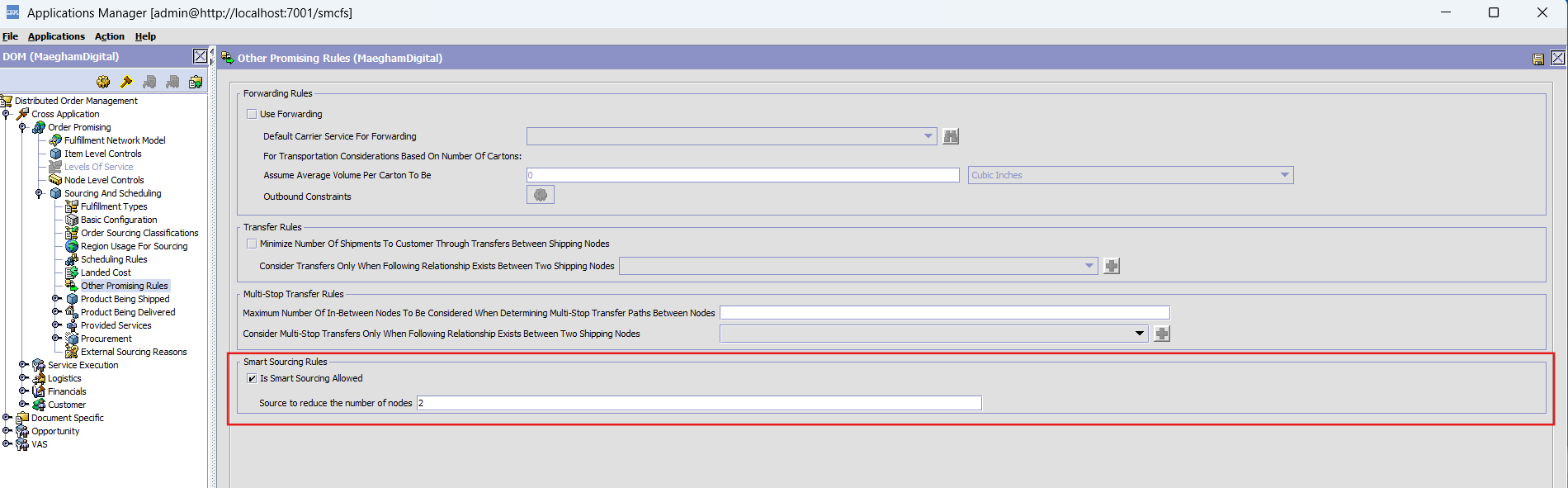
Enable the check box “is smart souring allowed”.
Source to reduce the number of node – reduces the number of eligible ship nodes to improve overall performance and efficiency.
Step2: Create a sourcing rule.
Path: DOM > cross application > order promising >sourcing and scheduling > product being shipped > sourcing rule.
Configure sourced from details.
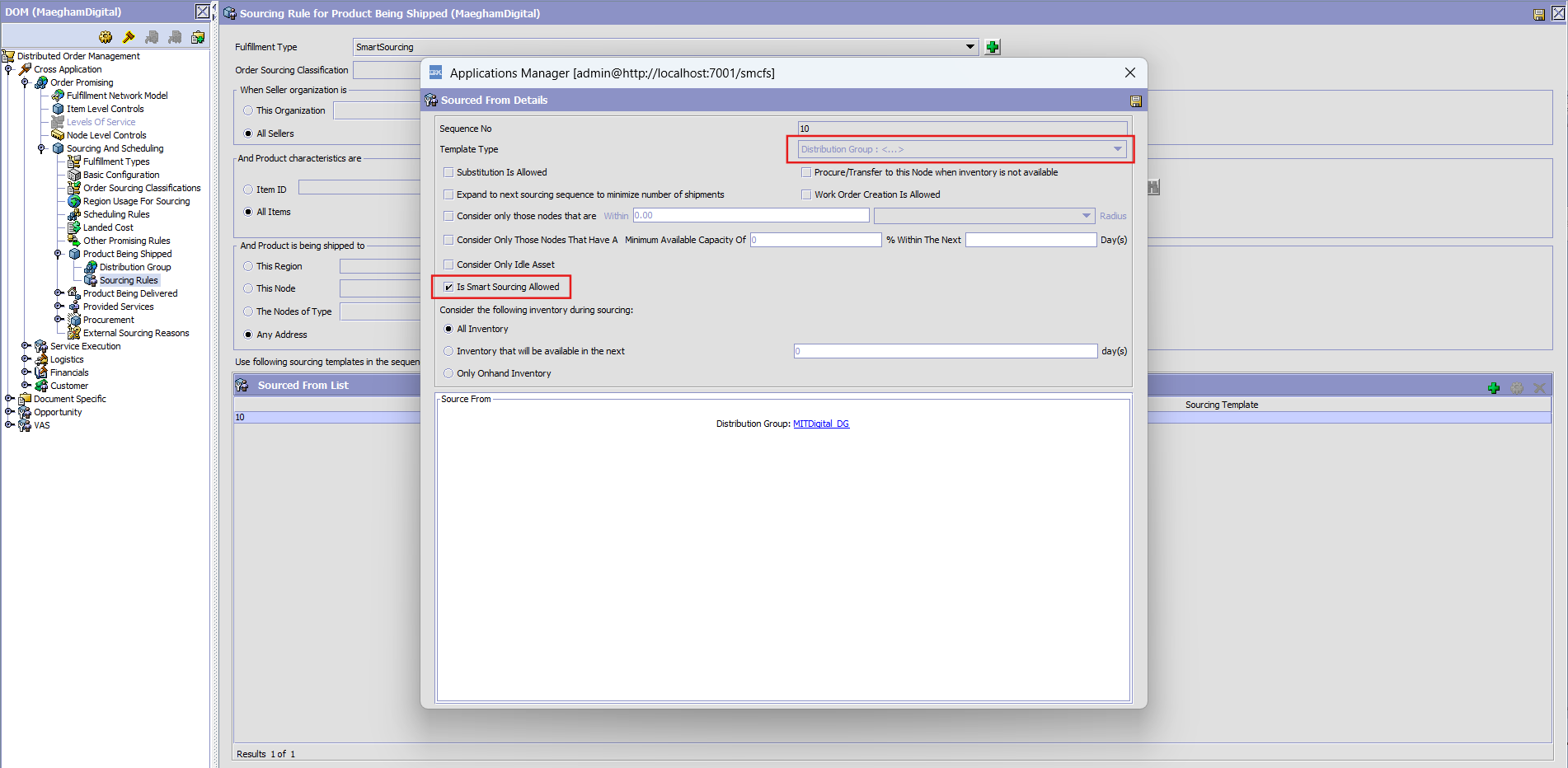
Enable the checkbox “Is Smart Sourcing allowed”, and configure the template type as ‘Distribution Group’.
Step3: Distribution group Configuration
Path: DOM > Cross application > order promising >Sourcing and scheduling > product being shipped > Distribution group.
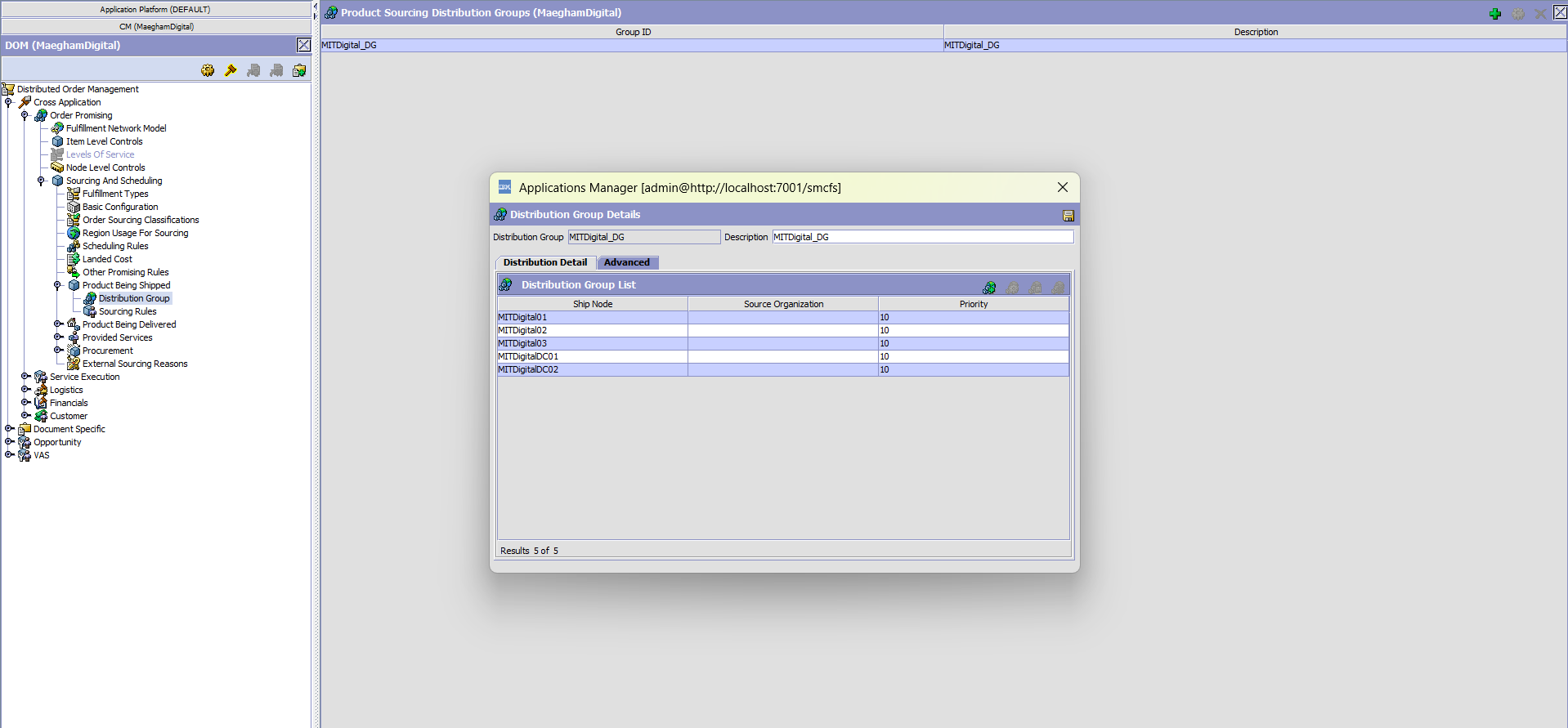
Step4: Scheduling Rule configuration
Smart Sourcing uses Scheduling Rules to determine the optimal fulfillment node based on the selected optimization.
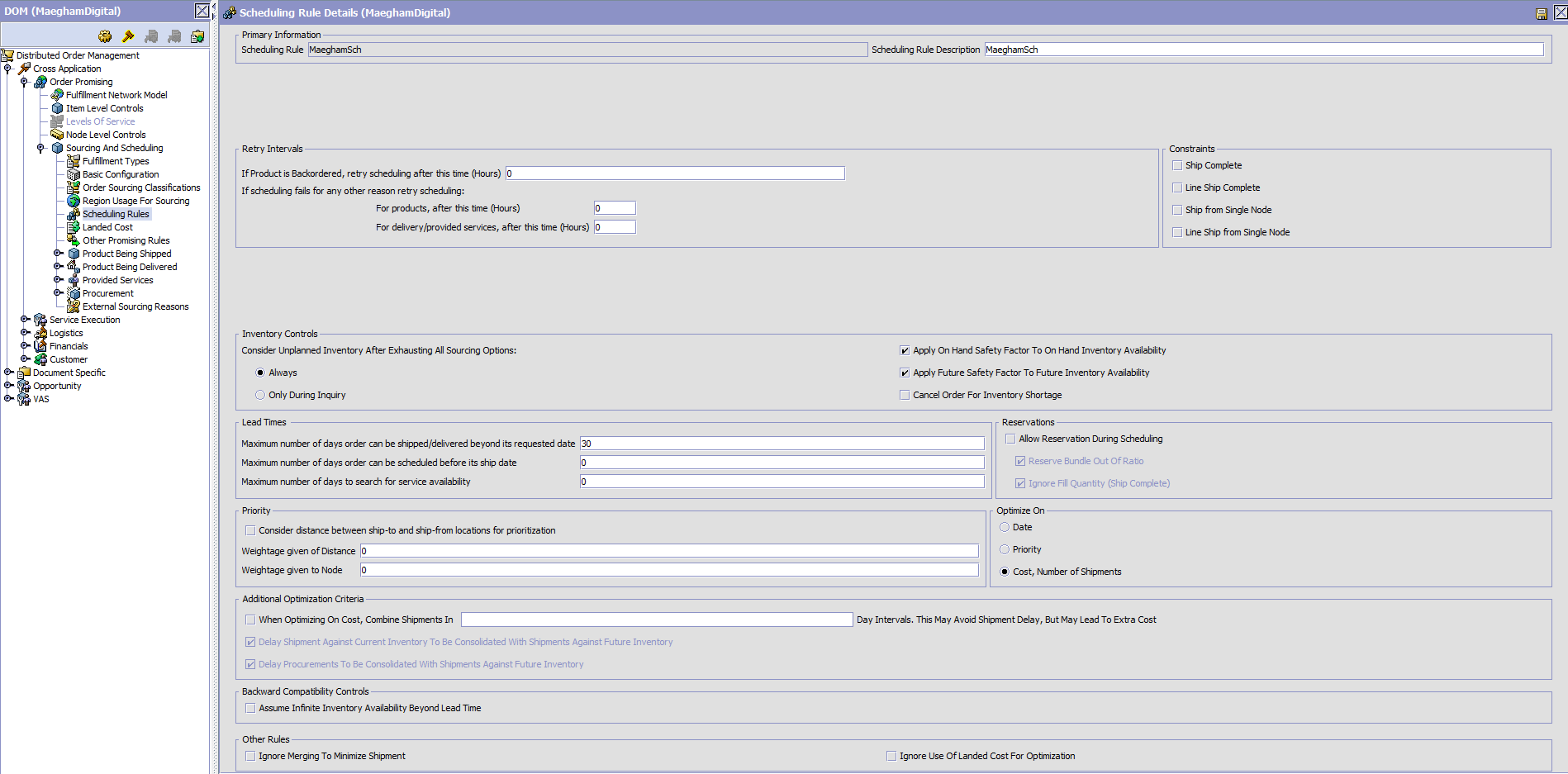 Determine node based on the optimization type:
When optimization is based on date, the alert data sorts nodes using the ONHAND_AVAILABLE_DATE and FIRST_FUTURE_AVAILABLE_DATE from the YFS_INVENTORY_ALERTS table and selects the top configurable number of nodes; when optimization is based on cost, it sorts nodes by the ESTIMATED_COST calculated by the Realtime Availability Monitor (RTAM); and for all other optimization types, it uses an internal distance calculation based on each node’s latitude and longitude to identify the nodes closest to the delivery address.
Smart souring ship node filtering:
Smart Sourcing filters ship nodes based on real-time availability:
Low Availability:
If inventory is available only in a limited number of nodes, Smart Sourcing narrows the selection to only those nodes that have inventory for the item.
High Availability:
If the item has sufficient inventory across nodes, the system selects nodes based on the configured optimization type (date, cost, or distance).
Example 1
Allocate the ShipNode Based on the Zip Code, Longitude and Latitude which will be calculating distance between ShipNode and Customers Location.
| City | Zip Code | Ship Node | Latitude | Longitude |
| Bangalore | 560001 | MITDigital01 | 10.78987 | 78.70585 |
| JPNagar | 560078 | MITDigital02 | 10.805045 | 79.095175 |
| Mysuru | 570001 | MITDigital03 | 9.951333 | 78.103659 |
| Belgaum | 590001 | MITDigitalDC01 | 10.009369 | 77.477055 |
| Hubli | 580020 | MITDigitalDC02 | 11.017363 | 76.958885 |
Step1: create a item using “manageItem” API and adjust inventory for that item using “adjustInventory” API.
| <ItemList><Item ItemGroupCode=”PROD” ItemID=”Iphone17Pro” OrganizationCode=”MaeghamDigital” UnitOfMeasure=”EACH”><PrimaryInformation AssumeInfiniteInventory=”N” ShortDescription=”Iphone17Pro” Description=”Iphone17Pro” ExtendedDescription=”Item” DefaultProductClass=”GOOD” IsPickupAllowed=”Y” IsDeliveryAllowed=”Y” IsForwardingAllowed=”Y” IsProcurementAllowed=”Y” IsReturnable=”Y” IsItemBasedAllocationAllowed=”Y” IsShippingAllowed=”Y” ReturnWindow=”30″ Status=”3000″/><InventoryParameters ATPRule=”MaeghamATP” InventoryMonitorRule=”MaeghamATPMonitorRule” LeadTime=”0″ IsItemBasedAllocationAllowed=”Y” NodeLevelInventoryMonitorRule=”MaeghamATPNMonitorRule”/></Item></ItemList> |
adjustInventory API:
| <Items> <Item AdjustmentType=”ABSOLUTE” ItemID=”Iphone17Pro” OrganizationCode=”MaeghamDigital” Quantity=”5″ ShipNode=”MITDigital01″ SupplyType=”ONHAND” UnitOfMeasure=”EACH” ProductClass=”GOOD”/> <Item AdjustmentType=”ABSOLUTE” ItemID=”Iphone17Pro” OrganizationCode=”MaeghamDigital” Quantity=”8″ ShipNode=”MITDigital02″ SupplyType=”ONHAND” UnitOfMeasure=”EACH” ProductClass=”GOOD”/> <Item AdjustmentType=”ABSOLUTE” ItemID=”Iphone17Pro” OrganizationCode=”MaeghamDigital” Quantity=”10″ ShipNode=”MITDigital03″ SupplyType=”ONHAND” UnitOfMeasure=”EACH” ProductClass=”GOOD”/> <Item AdjustmentType=”ABSOLUTE” ItemID=”Iphone17Pro” OrganizationCode=”MaeghamDigital” Quantity=”7″ ShipNode=”MITDigitalDC01″ SupplyType=”ONHAND” UnitOfMeasure=”EACH” ProductClass=”GOOD”/> <Item AdjustmentType=”ABSOLUTE” ItemID=”Iphone17Pro” OrganizationCode=”MaeghamDigital” Quantity=”20″ ShipNode=”MITDigitalDC02″ SupplyType=”ONHAND” UnitOfMeasure=”EACH” ProductClass=”GOOD”/></Items> |
Once the inventory is adjusted, an entry is created in the YFS_INVENTORY_ACTIVITY table.
Step2: RTAM (Real-Time Availability Monitor)
- RTAM is triggered in Activity-Based Mode.
- It reads the entries from YFS_INVENTORY_ACTIVITY and publishes inventory information to the external system.
- Once processed:
- Entry is removed from YFS_INVENTORY_ACTIVITY
- New entry is added to the YFS_INVENTORY_ALERTS table

Record created in the “YFS_INVENTORY_ALERTS” table.
Inventory Information:
| Ship node | ONHAND_AVAILABLE_QUANTITY |
| MITDigital01 | 5 |
| MITDigital02 | 8 |
| MITDigital03 | 10 |
| MITDigitalDC01 | 7 |
| MITDigitalDC02 | 20 |
STEP3: A customer from Bangalore, Karnataka requests 3 qty of the iPhone 17 Pro. Check how the ship node is allocated to the customer based on their location.
Made Find inventory call using the Smart Sourcing fulfillment type:
| <Promise AllocationRuleID=”MaeghamSch” OrganizationCode=”MaeghamDigital”><ShipToAddress State=”Karnataka” ZipCode=”560001″ Country=”IN”/><PromiseLines><PromiseLine DeliveryMethod=”SHP” LineId=”1″ FulfillmentType=”SmartSourcing” ItemID=”Iphone17Pro” RequiredQty=”3″ UnitOfMeasure=”EACH” ProductClass=”GOOD”/></PromiseLines></Promise> |
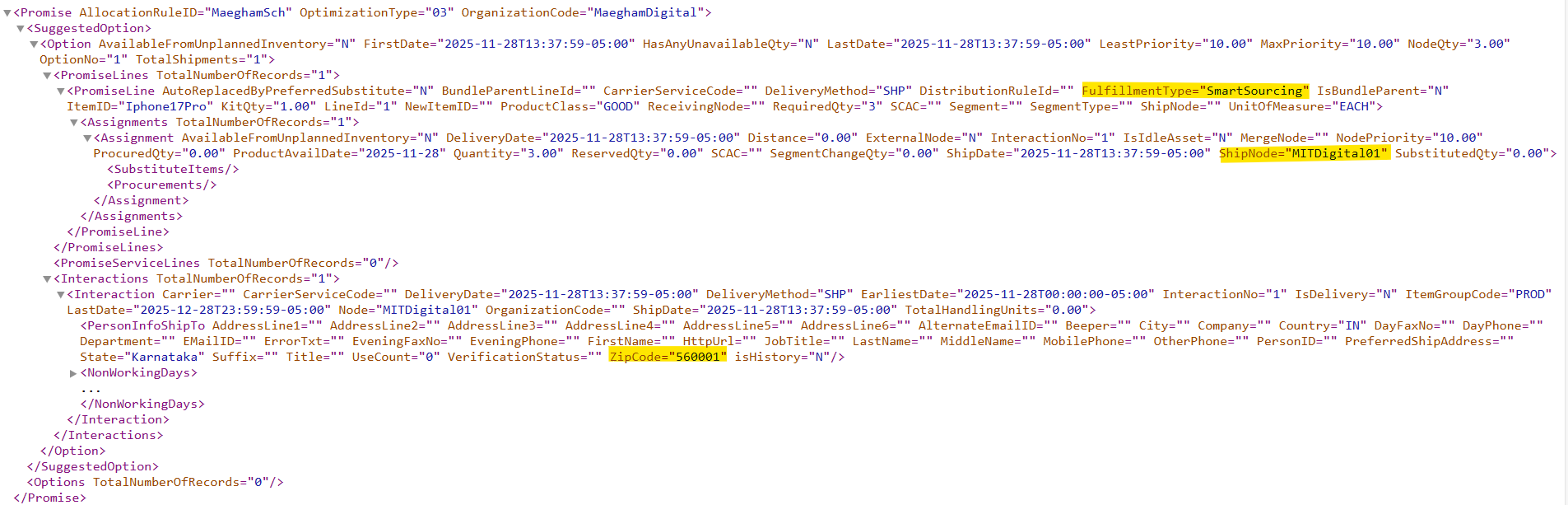
Smart sourcing check the inventory availability based on the records available in the YFS_INVENTORY_ALERTS table. For the delivery zip code 560001 (Bangalore) the system evaluates eligible nodes based on availability and proximity, the expected ship node is MITDigital01.
Example 2
A customer from Bangalore, Karnataka requests 10 qty of the iPhone 17 Pro. The on-hand available quantity in MITDigital01 (Bangalore) is 5 qty. Check how the ship node is allocated to the customer based on their location.
Made Find inventory call using the Smart Sourcing fulfillment type:
| <Promise AllocationRuleID=”MaeghamSch” OrganizationCode=”MaeghamDigital”><ShipToAddress State=”Karnataka” ZipCode=”560001″ Country=”IN”/><PromiseLines><PromiseLine DeliveryMethod=”SHP” LineId=”1″ FulfillmentType=”SmartSourcing” ItemID=”Iphone17Pro” RequiredQty=”10″ UnitOfMeasure=”EACH” ProductClass=”GOOD”/></PromiseLines></Promise> |
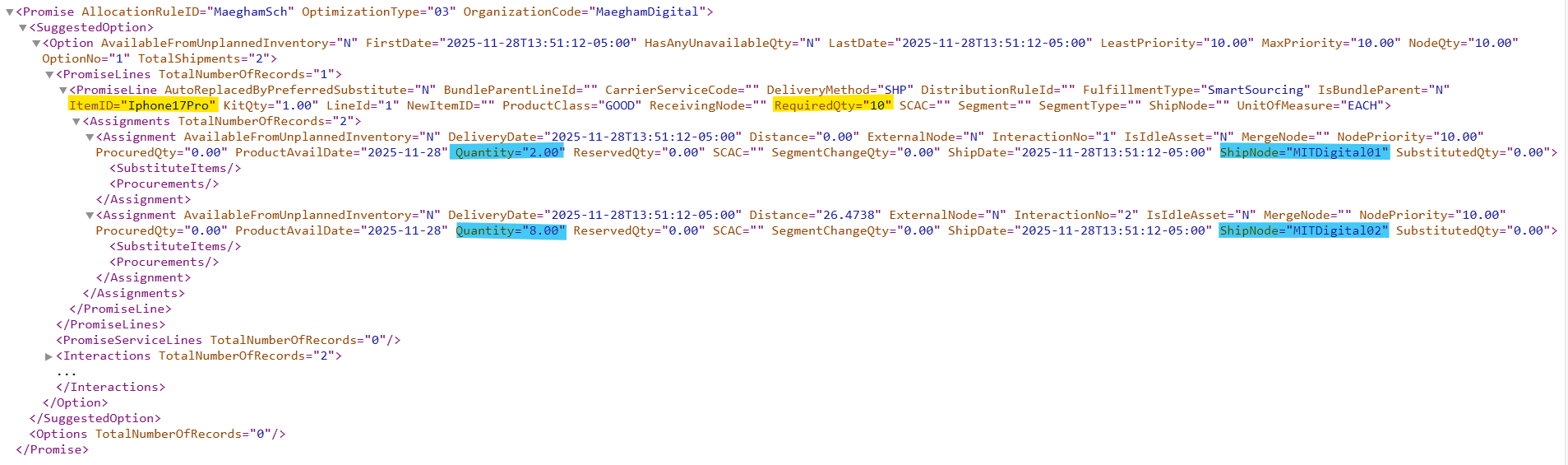
The source-to-reduce number of nodes is configured as ‘2’. Based on this configuration, Smart Sourcing attempts to identify the two most optimal nodes using the specified criteria before performing detailed inventory checks.
Example 3
A customer from Bangalore, Karnataka requests 20 qty of the iPhone 17 Pro. The on-hand available quantity in MITDigital01 (Bangalore) is 5 qty. Check how the ship node is allocated to the customer based on their location.
Made Find inventory call using the Smart Sourcing fulfillment type:
| <Promise AllocationRuleID=”MaeghamSch” OrganizationCode=”MaeghamDigital”><ShipToAddress State=”Karnataka” ZipCode=”560001″ Country=”IN”/><PromiseLines><PromiseLine DeliveryMethod=”SHP” LineId=”1″ FulfillmentType=”SmartSourcing” ItemID=”Iphone17Pro” RequiredQty=”20″ UnitOfMeasure=”EACH” ProductClass=”GOOD”/></PromiseLines></Promise> |
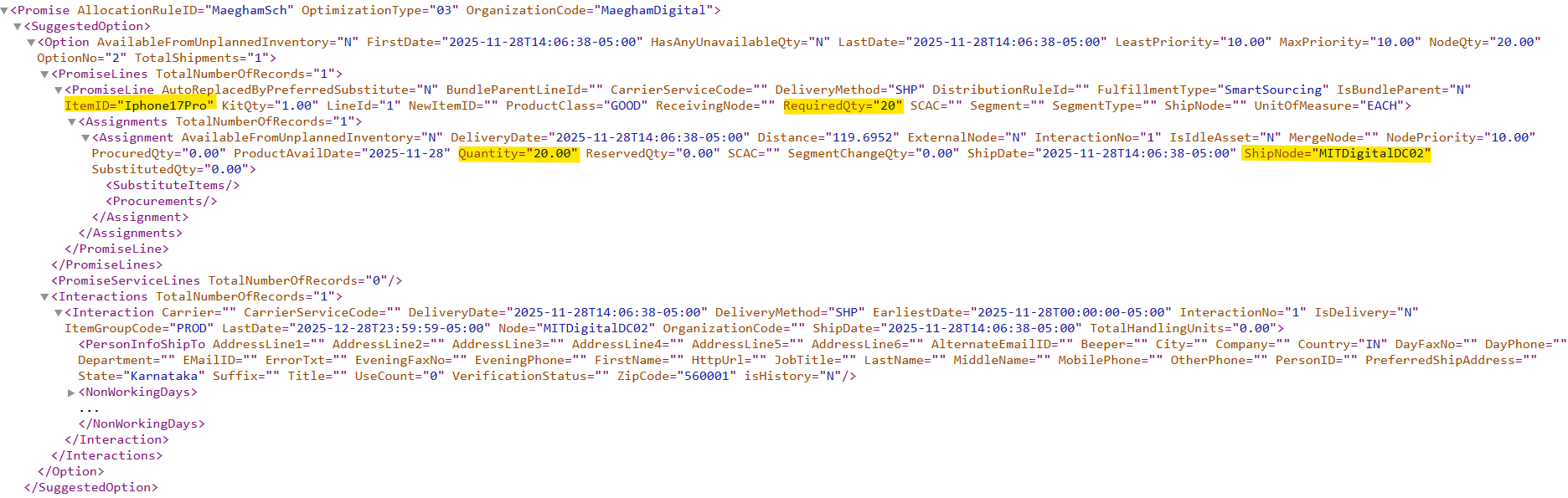
If inventory is not available at the designated ship node, Smart Sourcing attempts to allocate the order to a node where inventory is actually available. For the delivery ZIP code 560001 (Bangalore), the system evaluates eligible nodes based on inventory availability. Although MITDigital01 is the expected ship node, due to insufficient inventory, Smart Sourcing expands the allocation to nodes that have stock. As a result, MITDigitalDC02 is allocated instead
Conclusion:
Smart Sourcing in IBM Sterling OMS enables businesses to fulfill customer orders intelligently by selecting the most optimal fulfillment location based on inventory, cost, delivery commitments, and operational constraints. It helps reduce the number of nodes processed during sourcing, thereby improving overall system performance and stability. Smart Sourcing evaluates inventory data stored in the YFS_INVENTORY_ALERTS table to identify nodes that have available inventory for the requested item.