
INTRODUCTION
A Microservice is a small, independent, and self-contained application designed to perform a single, specific business function.
Each Microservice runs in its own process and communicates with other microservices through lightweight protocols, usually HTTP REST APIs or message queues like RabbitMQ or Kafka.
Instead of building one large monolithic system, microservices break the system into smaller components.
Each component focuses on a single function, such as user authentication, sending email.
Difference between Monolithic and microservice
- In a monolithic weather app, everything (city info, weather info, user info) exists in one large codebase.
- In a microservice architecture, each of those responsibilities becomes a separate service.
Frameworks like Spring Boot simplify the complexities in microservice.
Spring Boot Overview
Spring Boot is a Java framework that allows developers to build production-ready applications quickly with minimal configuration.
In a microservice setup, each Spring Boot app is an independent service with:
- Its own configuration
- Its own REST endpoints
- Its own (optional) database
These microservices communicate with each other using:
- HTTP REST APIs
- Or message queues (like RabbitMQ or Kafka)
Sample: Building a Weather Microservice
Let’s build a Weather Service using Spring Boot that fetches temperature data based on latitude and longitude.
Step 1: Create a New Spring Boot Project
In IntelliJ IDEA:
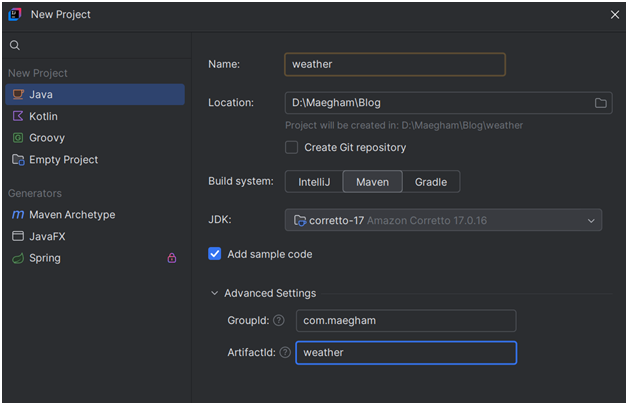
- Click File → New Project
- Choose Spring Boot
- Provide project details like:
- Project name: weather
- Group: com.maegham
- Artifact: weather
- Click Create
Step 2: Add Spring Boot Web Dependency
In your pom.xml, include the Spring Web dependency to create REST APIs.
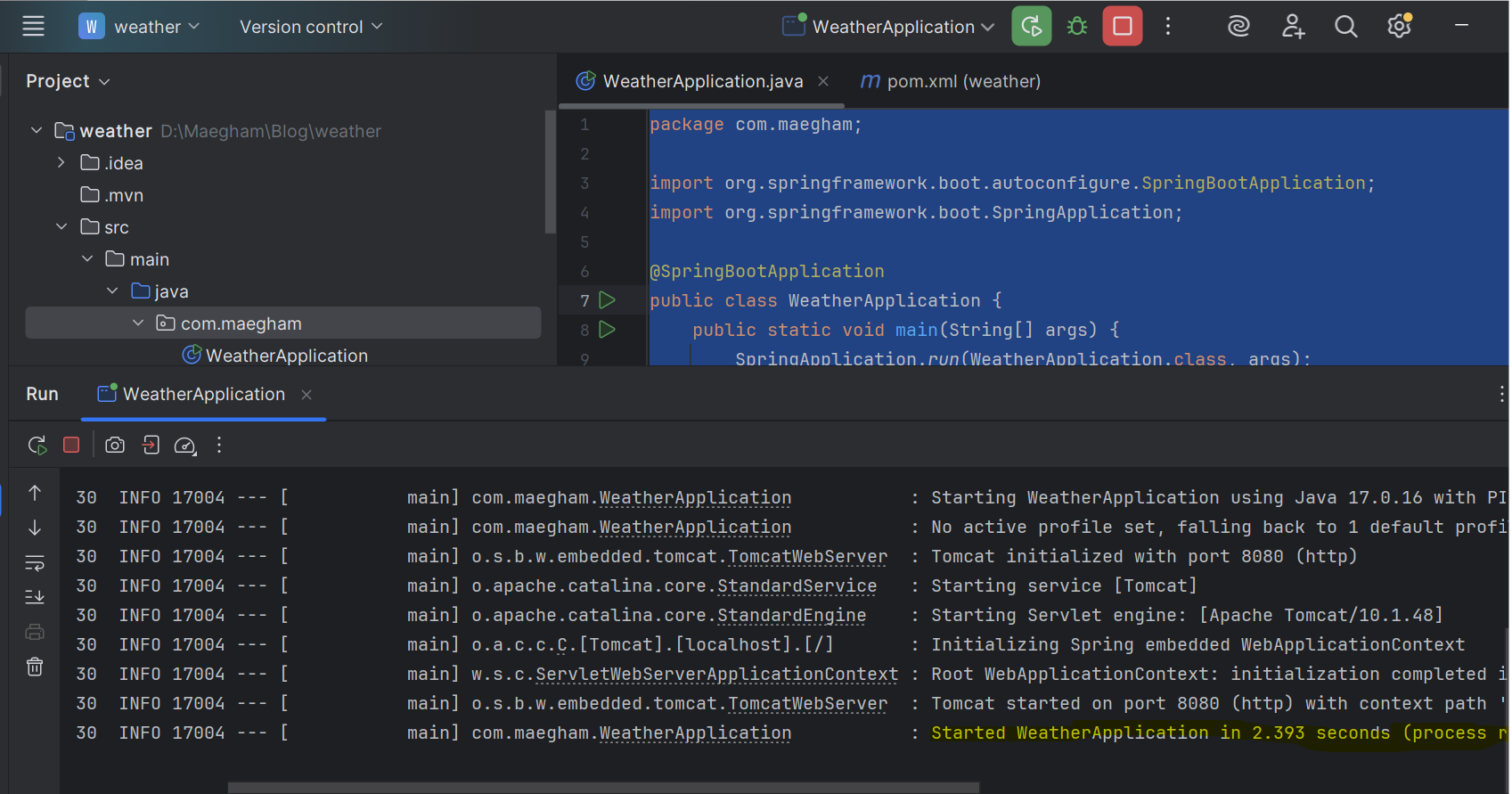
Explanation:
- spring-boot-starter-web → Everything needed to build web applications (Spring MVC, Tomcat).
- lombok → Generates boilerplate code like getters/setters.
- springdoc-openapi → Enables API documentation with Swagger UI.
- spring-boot-starter-validation → Adds request validation capabilities.
Project Architecture
weather/
├── config/
│ └── RestTemplateConfig.java
├── controller/
│ └── WeatherController.java
├── model/
│ └── WeatherRequest.java
├── service/
│ └── WeatherService.java
└── WeatherApplication.java
This structure follows a clean, layered architecture:
| Layer | Responsibility |
| Controller | Handles API requests and responses |
| Service | Contains the core business logic |
| Model | Defines input/output data |
| Config | Provides reusable beans like Rest Template |
Step 3: Create the Main Application Class

Explanation:
This is the main class the starting point of your Spring Boot app.
When you run it, Spring Boot:
- Initializes the entire application context
- Scans all packages for components like @RestController, @Service, etc.
- Starts an embedded Tomcat server on port 8080
Annotations
Annotations in Spring Boot is to use in-code instructions to automate configuration and reduce code setup.
- @SpringBootApplication = combination of:
- @Configuration – defines beans
- @EnableAutoConfiguration – configures dependencies automatically
- @ComponentScan – detects Spring components
Step 4: Create RestTemplate Configuration
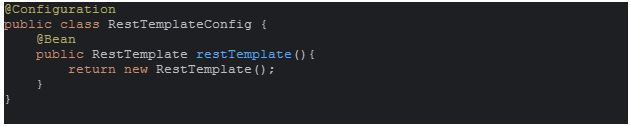
Explanation:
This class provides a RestTemplate bean — a Spring helper used to make HTTP requests to external APIs.
- @Configuration → Marks this class as a source of bean definitions
- @Bean → Registers RestTemplate for dependency injection (@Autowired)
Now, any class can call external APIs using RestTemplate without manually creating HTTP clients.
Step 5: Create a Request Model (POJO)

Explanation:
This defines the structure of data expected in a POST request.
- @Data → Lombok annotation that auto-generates getters, setters, and utility methods.
- Fields represent latitude and longitude for weather lookup.
Example Request:
{
“latitude”: 37.7749,
“longitude”: -122.4194
}
Step 6: Create the Service Layer
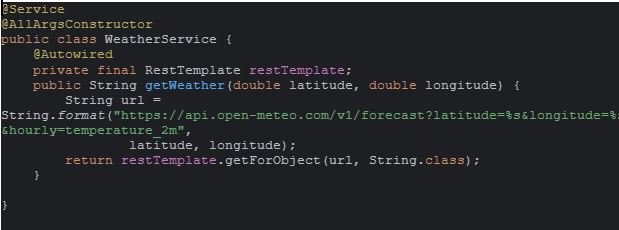
Explanation:
The service layer contains the core logic of the application.
- @Service → Marks this class as a business logic layer
- RestTemplate → Makes HTTP GET calls to external APIs.
- getWeather() → Builds a dynamic URL using coordinates and returns the response from Open-Meteo.
Step 7: Create the REST Controller
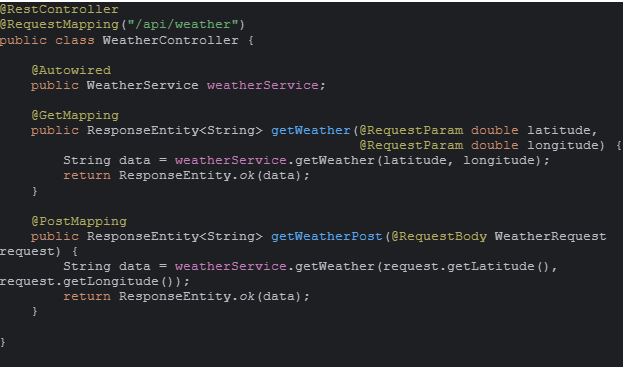
Explanation:
The controller defines your REST API endpoints.
- @RestController → Indicates that this class handles RESTful requests.
- @RequestMapping(“/api/weather”) → Base URL for all endpoints.
- @GetMapping → Handles GET requests with query params.
- @PostMapping → Handles POST requests with JSON body.
Both endpoints call the same service method to fetch live weather data.
How Everything Connects
Start the application
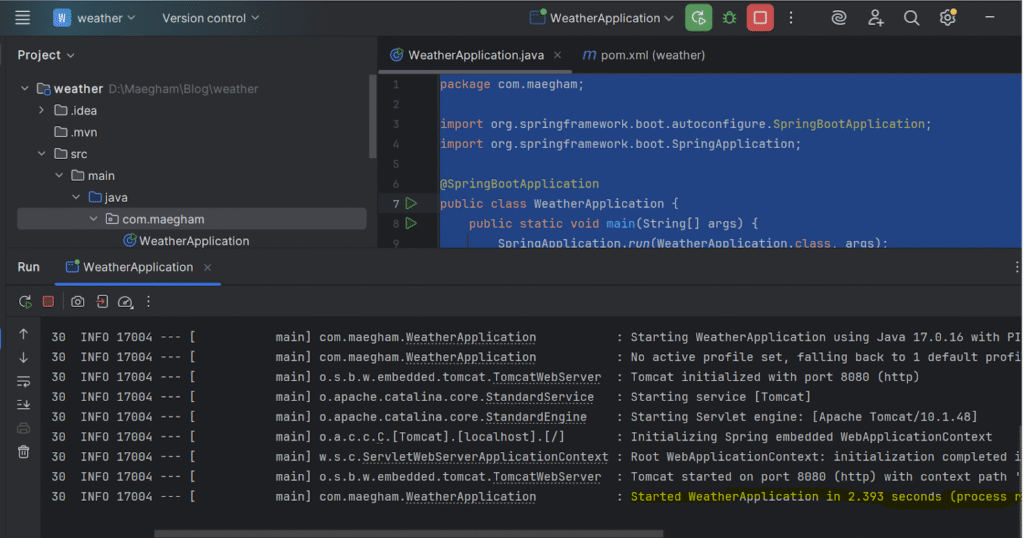
- WeatherApplication.java will starts the Spring Boot app.
- The embedded Tomcat server runs on the default port 8080.
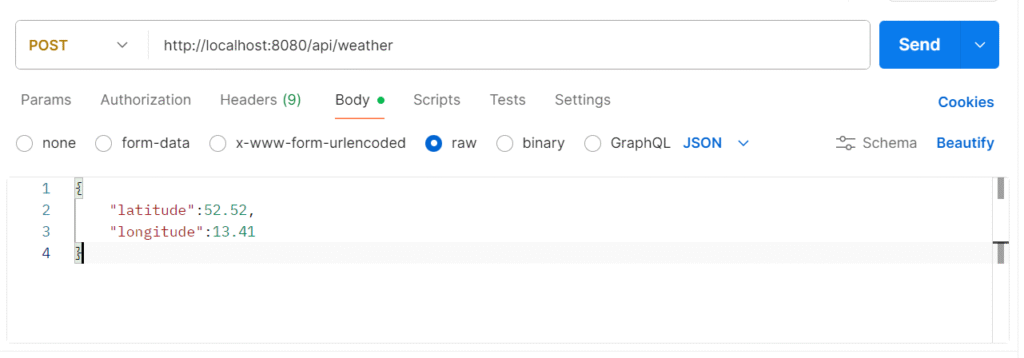
- User sends a GET or POST request to “/api/weather”.
- The Controller parse the input and invoke WeatherService.
- WeatherService communicate with the Open-Meteo API using RestTemplate.
- The response returned to client in JSON.
Request
Response
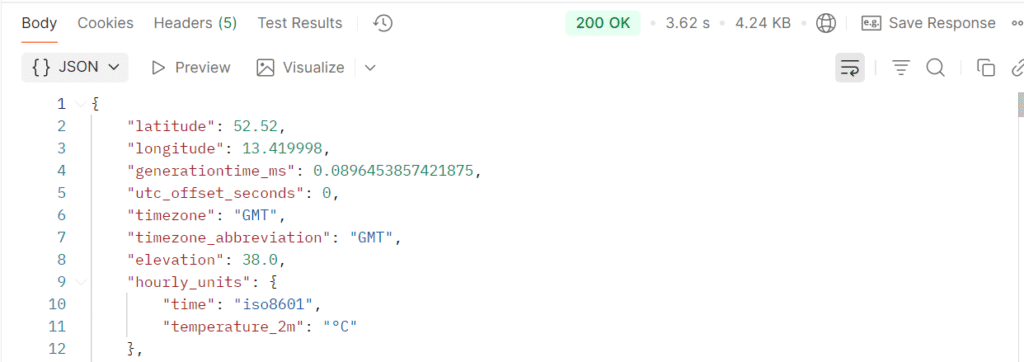
This represents hourly temperature data for the specified location.
Structure
This layered structure ensures your code is:
- Easy to test
- Easy to maintain
- Easy to extend (e.g., add caching, error handling)
Key Spring Annotations
| Annotation | Description |
| @SpringBootApplication | Marks the main entry point and enables auto-configuration |
| @Data | Generates getters/setters using Lombok |
| @Service | Defines a service layer component |
| @RestController | Creates RESTful web services |
| @RequestMapping | Defines a base path for endpoints |
| @Autowired | Injects dependencies automatically |
| @GetMapping | Maps HTTP GET requests |
| @PostMapping | Maps HTTP POST requests |
Conclusion
This project demonstrates:
- The structure a microservice project
- To make external API calls
- To handle both GET and POST requests