
Introduction:
A blind return order is initiated when a customer returns an item without providing the original sales order reference. In such cases, the return order can be created manually using the customer’s payment information to process the refund. Blind return orders can only be created for products exclusively sold by that particular brand and not available through other retailers. This brand validation is essential to prevent fraudulent returns and ensure inventory integrity. Once the product passes quality inspection, the refund is issued to the customer using the associated payment method. Sterling OMS records the refund details to maintain a clear transaction history.
Blind return orders can be created through both the IBM Sterling Store application and the Call Center application, allowing store associates and customer service representatives to handle returns without a sales order reference.
Configuration:
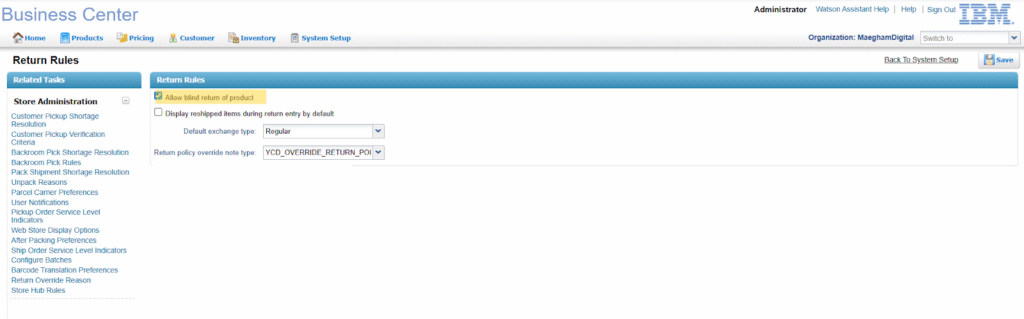
To allow blind return order creation in the IBM Sterling Store application, enable this check box in Sterling Business Center.
Navigate to System Setup > Store > Returns > Return Rules and Enable the checkbox labeled “Allow Blind Return of Product”.
BlindReturn_Img_001
This setting allows store associates to create return orders without requiring the original sales order reference.
Order Flow:
When a customer attempts to return a product that was originally received as a gift, they typically do not have access to the original sales order details. In such cases, the system supports the creation of a Blind Return order. The customer returns the product directly at the store without providing any sales order reference. A Blind Return order can only be created for items exclusively sold by that brand, in order to prevent fraudulent returns of products purchased through other retailers.
Since the original order information is unavailable, the customer provides payment details to specify the method by which the refund should be processed. In this scenario, the refund is issued in cash, ensuring that the customer receives the refund amount in a secure and traceable manner.
Input to create Blind Return order:
| <Order OrderNo=“Y100006829” AllocationRuleID=“MaeghamSch” BuyerOrganizationCode=“MaeghamDigital” DocumentType=“0003” EnterpriseCode=“MaeghamDigital” SellerOrganizationCode=“MaeghamDigital”><OrderLines><OrderLine DeliveryMethod=“SHP” FulfillmentType=“HomeDelivery” OrderedQty=“2”><Item ItemDesc=“Iphone12Pro” ItemID=“Iphone12Pro” ItemShortDesc=“Iphone12Pro” ProductClass=“GOOD” UnitOfMeasure=“EACH”/><LinePriceInfo IsPriceLocked=“Y” UnitPrice=“1000”/></OrderLine></OrderLines><PaymentMethods><PaymentMethod PlannedRefundAmount=“2000” PaymentType=“CASH” PaymentReference1=“Y100006829” /></PaymentMethods><PersonInfoShipTo AddressLine1=“” AddressLine2=“” AddressLine3=“” AddressLine4=“” AddressLine5=“” AddressLine6=“” City=“Theni” Company=“MaeghamInfoTech” Country=“IN” FirstName=“” JobTitle=“” LastName=“” MiddleName=“” MobilePhone=“” State=“TN” Title=“” ZipCode=“520001”/><PersonInfoBillTo AddressLine1=“” AddressLine2=“” AddressLine3=“” AddressLine4=“” AddressLine5=“” AddressLine6=“” City=“Theni” Company=“MaeghamInfoTech” Country=“IN” FirstName=“” JobTitle=“” LastName=“” MiddleName=“” MobilePhone=“” State=“TN” Title=“” ZipCode=“520001”/></Order> |
The value passed in PlannedRefundAmount represents the refund amount allocated to the chosen payment type. When multiple payment methods are involved, each method carries its own PlannedRefundAmount to ensure accurate distribution of refunds. This field is exclusive for Return Orders and is not used in sales or exchange transactions.
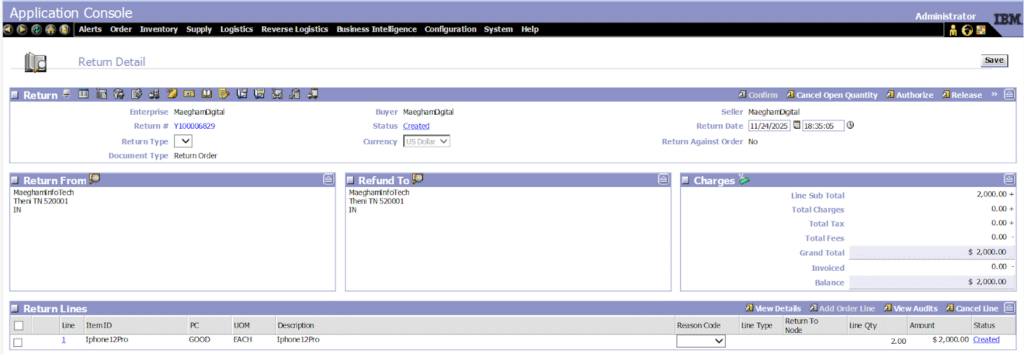
BlindReturn_Img_002
The order status is updated to Shipped, and the receipt process is completed immediately, as the customer is returning the product directly at the store.
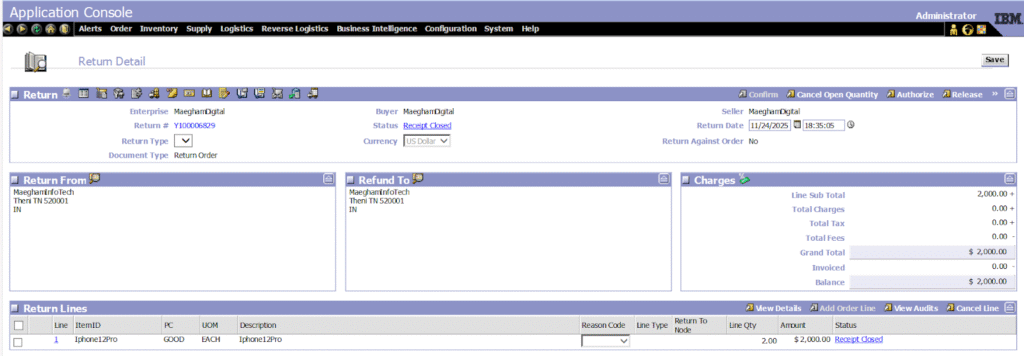
BlindReturn_Img_003
The invoice is now created for the Return Order.
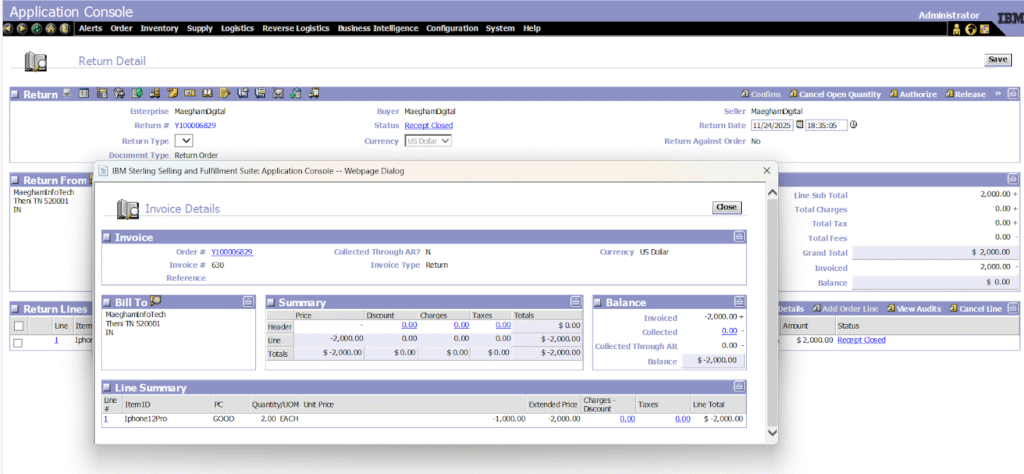
BlindReturn_Img_004
An entry is then created in the Return Order Charge Transaction table for the invoice amount, with the charge type set to RETURN.

BlindReturn_Img_005
When the Request Collection Agent runs, it creates a Charge Entry in the YFS_Charge_Transaction table. A REFUND_SETTLEMENT record in the YFS_Charge_Transaction table indicates that the refund amount has been settled.

BlindReturn_Img_006
Once the Execute Collection Agent picks up the Charge record, it triggers the creation of a Sales Order. This Sales Order is used to issue a Gift Card to the customer, thereby completing the refund process.

BlindReturn_Img_007
The Request Collection Agent picks up the return order charge record and updates its status to Checked.

BlindReturn_Img_008
Conclusion:
Blind returns offer a customer-friendly way to handle returns when the original sales order is unavailable, supporting scenarios like gift returns or lost receipts. This flexibility improves customer satisfaction. However, to ensure return eligibility and prevent fraud, blind returns are permitted only for products exclusively sold by that brand and not available through other retailers.